Adding Interval Winners
You can setup multiple winners while the competition is live, perfect for advent calendars or daily winner competitions.
Winners are automatically chosen at random on the date you’ve scheduled and if you are rewarding site credit they will be automatically paid.
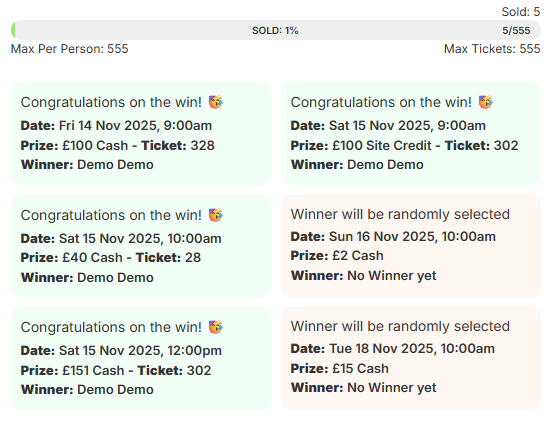
How it looks for customers
How to setup interval winners
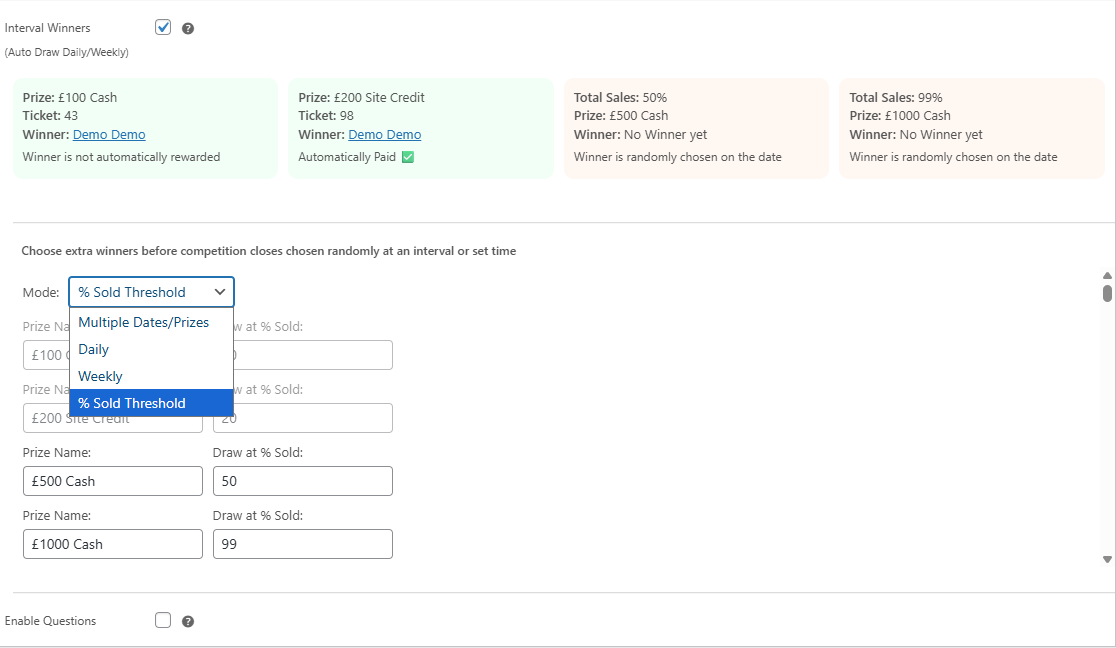
Check the Interval Winners option on the Edit Competition page near where you setup Questions, you will see different modes (Sold %, Daily, Weekly, Multiple Dates).
The boxes below will show you when each scheduled interval winner will take place for clarity.
Modes
Specific fixed times that you set, for example 9th November 9am
Automatic intervals from the base date you set
When the total sales percentage sold equals or surpasses the number you set
Restrictions of Interval Winners
You cannot have an interval winner at the same time or beyond the competition ending date.
You cannot edit an interval winner if someone has won but you can add new ones.
Any prizes that are not site credit will not be rewarded automatically are treated like main prizes, you will need to reward them yourself however they're automatically and randomly chosen the same way as an Auto Draw.